Online service · 24 / 7

Free CVN check.
Fix in the portal.

Drop the file here — see the CVN instantly, for free, without sign-up. To get the fixed file: sign up in the portal, re-upload the Original + Modified there and apply the fix from 30 credits.

CVN CALCULATOR UPDATES
29.06.2026 - Version V2.0
Added :
        BOSCH PCR 2.1 - VAG (Audi / Seat / Skoda / Volkswagen) :
            Continental TC1796
        BOSCH MDG1 / MG1 - BMW :
            MG1CS003 (82 авто) · MD1CS001 · MD1CP002 · MG1CS201 · MG1CS024
        BOSCH MEVD17 - BMW :
            MEVD17.2.3 · MEVD17.2.G · MEVD17.2.9 · MEVD17.2.4 · +8 блоков (87 BMW)
        BOSCH MED177 - Mercedes-Benz :
            MED17.7.2 · MED17.7.3 · MED17.7.1 · MED17.7.3.1 · MED17.7.5 · MED17.7.7
        BOSCH MDG1 - Mercedes-Benz :
            MD1CP001 · MG1CP002 · MD1CS006
01.05.2026 - Version V1.0
Added :
        BOSCH MD1 / MG1 - VAG (Audi / Cupra / Seat / Skoda / VW) :
            MG1CS011 (182 авто) · MD1CS004 · MD1CP004 · MG1CS001 · MG1CS002
            MG1CS111 · MG1CS008 · MD1CP014 · MG1CS163 · MG1CS031
        BOSCH MED17 / EDC17 - VAG :
            EDC17C46 (402 авто) · EDC17C64 · EDC17CP14 · MED17.5 · MED17.1
            MED17.5.2 · EDC17CP44 · EDC17CP54 · EDC17C54
portal.chipoktuning.com/cvn
CVN calculator

Choose a CVN tool

VAG, BMW and Mercedes are supported.

VAG 20 блоков

BMW 17 блоков

Mercedes 9 блоков

How it works

From file upload to fixed firmware — fast and simple

01

Drop a file — see the CVN for free

Open the CVN tool you need and drop the file. The CVN is calculated instantly — no login or credits. It's a free preview: diagnostics, nothing more.

CVN A1B2C3D4
02

Register on the portal

To apply the fix and download the finished file, you need a CHIPOK Portal account. Registration takes 30 seconds — just email and password. New users get a welcome bonus.

Email
tuner@example.com
Create account
03

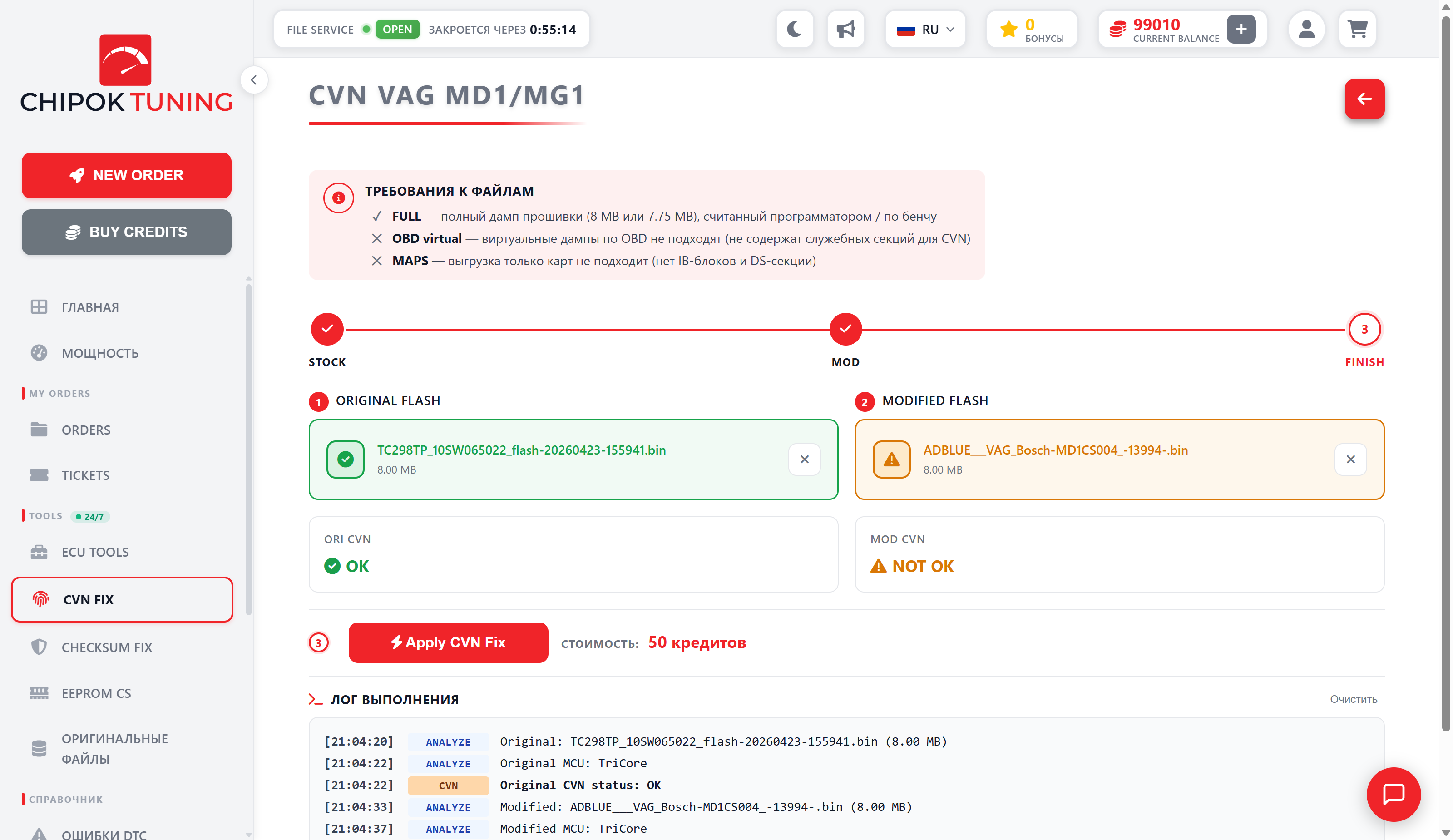
Upload Original + Modified on the portal

On the portal, open the same CVN tool and upload both files again — Original and Modified. At this stage the CVNs don't match — which is exactly why the fix is needed.

CVN ORI A1B2C3D4
CVN MOD 7F2E991C
04

Apply the fix and download

Click "Apply CVN Fix" on the portal — from 30 credits are charged (depending on the platform). The MOD CVN now matches the ORI CVN. The result downloads as a flash-ready ZIP.

CVN ORI A1B2C3D4
CVN MOD A1B2C3D4
stock_8mb_no_checksum.zip Download

Frequently asked questions

Brief answers about CVN, file requirements and the fix process.

Can I get the fixed file directly from this page?

No — this site is preview only. Here you can drop a file and see the CVN for free, without registration. To get the fixed file (with the restored CVN + all recalculated CRCs), you need to: (1) register on the portal, (2) open the same CVN tool on the portal and upload Original + Modified there again, (3) apply the fix from 30 credits and download. We split the process this way so the calculator stays free and accessible without forced registration.

What is CVN and why fix it?

CVN (Calibration Verification Number) is a 32-bit hash that the ECU computes from its calibration data. OEM diagnostics and emissions scanners read this number to verify the firmware against the reference. After tuning, the CVN no longer matches the original — readiness checks may fail and inspectors may flag the unit as "modified". Our calculator restores the CVN to the original — after the fix, the tuned firmware is invisible to OBD diagnostics.

Which ECU platforms are supported?

Currently: VAG MD1 / MG1 (Infineon TriCore TC1797/TC1782/TC1791 + Freescale PowerPC MPC5775B) and VAG MED17 / EDC17 (Bosch on TriCore TC1766/TC1767/TC1782/TC1796/TC1797/TC1793 — petrol MED17 and diesel EDC17, including EDC17C46/C54/C64/C74/CP14/CP44/CP74). Coming soon: EDC16/EDC15, ME7/MED9, Continental SIM2K, Delphi DCM, Siemens SIMOS18/SIMOS12. The processor variant is detected automatically — no need to specify it.

Are my files stored on your server?

No. Both dumps (original and modified) are processed in memory and deleted immediately after the response. Only the fixed result is stored — in the order history, so you can download it again if you lose the first copy. The original and modified files are never written to disk.

How long does the fix take?

About 30 seconds end-to-end — you drop two files, see the CVN preview, click Apply and get the fixed file. The pipeline makes three passes: pre-CVN CRC fix, CVN patch (a 4-byte correction slot in the DS + MEM sections), then post-CVN CRC fix. There's no queue waiting for a technician — pure self-service.

Do I need to register to use it?

The CVN preview is always free and requires no login — drop a file, see the CVN. To download the fixed file with the applied fix, you need a CHIPOK Portal account. The process: (1) register on the portal → (2) open the same CVN tool on the portal and upload Original + Modified again → (3) apply the fix from 30 credits → download. The calculator on this site is a preview showcase only. New users who register through this calculator get a welcome bonus on their first fix.

Which file format should I upload?

A full firmware dump (.bin), read via bench, in boot mode or over OBD (full read). For VAG MD1/MG1 this is usually 8 MB or 7.75 MB; for MED17 / EDC17 — 1.5 / 2 / 2.5 / 4 MB. Both files (original + modified) must be from the same ECU. OBD-virtual dumps and calibration-only exports are not supported — they lack the service sections needed to compute and patch the CVN.

What if the Mod CVN doesn't match the original after the fix?

The execution log shows every step — pre-CVN CRC pass, CVN patch, post-CVN CRC pass. After the fix, the Mod CVN should exactly equal the Ori CVN. If it doesn't, the cause is usually a file mismatch (different ECU types in the original and modified files) or a corrupted dump. Open a support ticket on the portal with both files — we'll look into it and refund the credits if the problem is on our side.

Can the fixed file be flashed directly?

Yes — the output is a full firmware image with recalculated CRCs and a CVN patched back to the original. You can flash it the same way you read the original (bench / boot / programmer). The result's _no_checksum suffix is a reminder that the checksums are already recalculated — your flasher must NOT run its own checksum routine on top of ours.

Can I get my credits back if the fix didn't work?

Yes — if the tool couldn't produce a correct file due to our error, the credits are refunded automatically (you'll see the refund as credit_back in your credit history). For edge cases requiring manual review, open a support ticket on the portal — we usually reply within a few hours on business days.

How much does it cost?

From 30 to 50 credits per fix, the price depends on the platform: MED17 / EDC17 — 30, PCR 2.1 — 40, MD1 / MG1 — 50. Credits are bought in packs in the portal's Shop. No subscription, no minimums, no monthly fees — you pay only for what you fix.

Ready to make your first CVN fix?

Register through this calculator and get a welcome bonus on your first fix.

Register free